Your KitchenAid stand mixer has served you faithfully for years, but now it’s making unusual noises or won’t power on. Before you call a professional or replace the entire appliance, you might be considering how to open a KitchenAid mixer to diagnose the problem yourself. While accessing internal components can help with cleaning, brush replacement, or troubleshooting electrical issues, the process requires careful preparation and awareness of potential pitfalls. Most KitchenAid mixers follow similar disassembly principles regardless of whether you own a classic tilt-head model or a larger bowl-lift version, but specific steps vary significantly by model year and capacity.
Opening your mixer isn’t as simple as removing a few screws—it involves understanding the interlocking components that keep this powerful appliance functioning safely. If your mixer is still under warranty, attempting disassembly will almost certainly void that coverage, so weigh the potential savings against the risk of creating more expensive problems. For those with out-of-warranty units or who simply want to understand their appliance better, knowing how to open a KitchenAid mixer properly can extend its lifespan significantly while giving you valuable insight into its mechanical design.
Important disclaimer: The information provided here outlines general principles only, as specific disassembly procedures require model-specific knowledge. Without access to your exact mixer model’s service manual, certain steps could cause damage if performed incorrectly. Always consult your owner’s manual first and consider watching manufacturer-approved video tutorials before attempting any disassembly.
Essential Safety Measures Before Opening Your Mixer
Power Down and Workspace Preparation
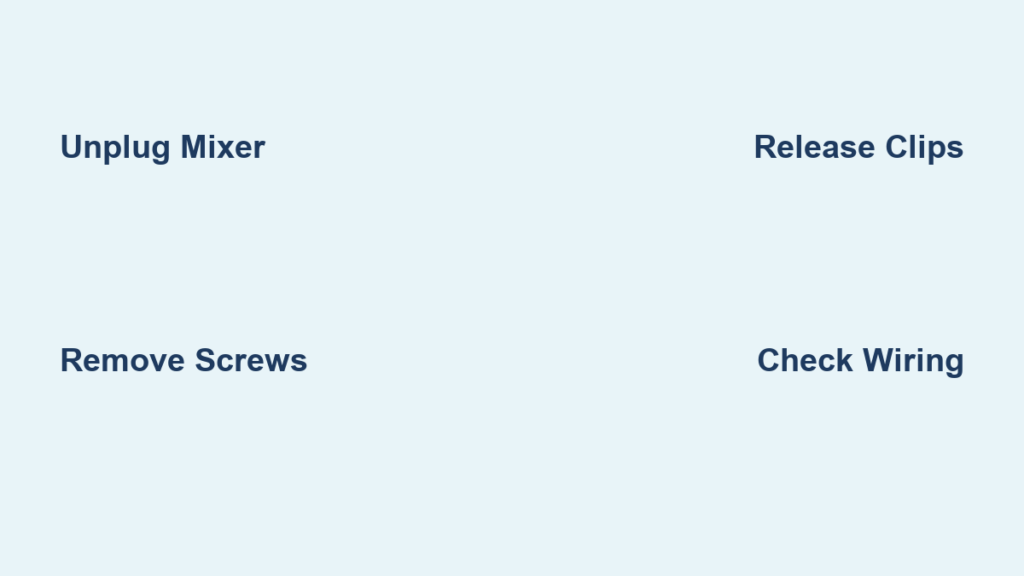
Before you even touch a screwdriver, unplug your KitchenAid mixer from the electrical outlet—this simple step prevents potentially dangerous electrical accidents during disassembly. Many DIY repair attempts go wrong because users assume the mixer is safe once turned off, forgetting that capacitors can hold electrical charges even when unplugged. Place the mixer on a clean, well-lit work surface covered with a soft towel to protect its finish from scratches and provide traction during the process.
Gather the Right Tools for the Job
Most KitchenAid mixers require just a few basic tools for initial disassembly. A complete set of Phillips head screwdrivers in various sizes handles approximately 90% of external fasteners, while a flathead screwdriver helps release plastic clips and covers. Some models incorporate hex or Torx screws, so having a versatile bit set prevents mid-repair frustration. Keep a magnetic parts tray or small container nearby to organize screws by location—mixer disassembly often reveals multiple screw types of similar appearance but different lengths, and mixing them up can cause assembly problems later.
Identify Your Mixer Type Before Starting
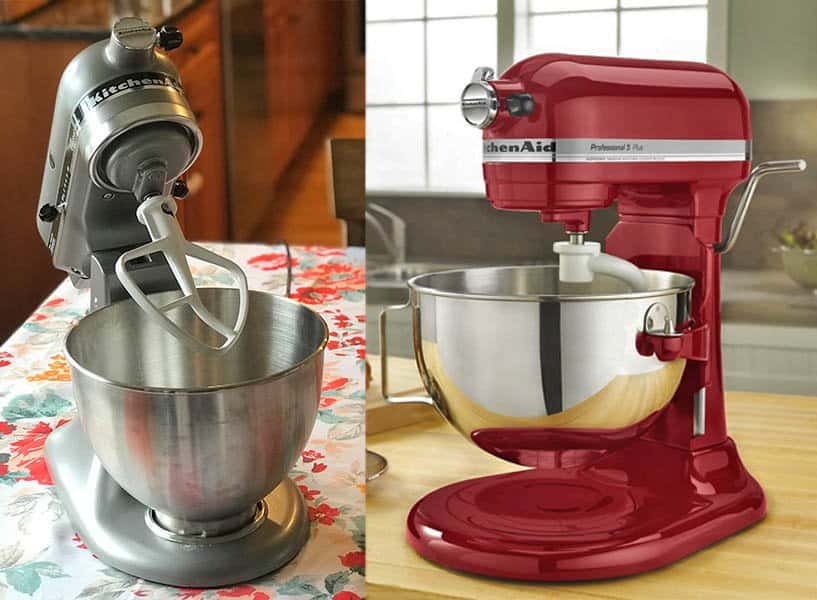
Tilt-Head Models: Simpler Access Points
If you own a 4.5-quart or 5-quart KitchenAid Artisan series mixer, you’re working with a tilt-head design that generally offers more straightforward access to internal components. These models feature a locking lever at the back that allows the entire head to tilt backward for bowl access. To begin disassembly, locate the rear band cover—a curved plastic piece that wraps around the back of the head assembly. This cover typically secures with three to five visible screws, though some newer models hide fasteners beneath rubber plugs or decorative elements. Before removing any screws, tilt the head to its working position to avoid damaging internal wiring during the process.
Bowl-Lift Models: More Complex Disassembly
Owners of 6-quart Professional or Commercial series mixers face a more intricate disassembly process due to the bowl-lift mechanism. These stationary-head models require removing the entire base assembly to access critical components, as the motor and electrical systems sit lower in the housing. Start by lowering the bowl lift completely to expose potential access points beneath the mixer head. Unlike tilt-head models, bowl-lift mixers often have screws concealed beneath the rubber feet or behind the splash guard, requiring additional steps before reaching the main housing.
Systematic Disassembly Process

Locate and Document All External Fasteners
Begin by examining your mixer from all angles to identify every visible screw. KitchenAid strategically places fasteners in non-obvious locations—check around the speed control knob, beneath the mixer head, and along the base perimeter. Take multiple photographs with your smartphone before removing the first screw; these visual references prove invaluable during reassembly when you’re trying to remember which screw belongs where. As you remove each fastener, place it in a labeled container or on a piece of tape marked with its location (e.g., “rear cover top,” “base left side”).
Handle Snap-Fit Components with Care
Many KitchenAid mixers incorporate plastic clips and snap-fit components that resist casual removal. When a cover or panel doesn’t lift away after screw removal, examine it closely for hidden release points—often small indentations or seams indicating where to insert a flathead screwdriver. Apply gentle, even pressure while working around the perimeter; forcing components can crack the plastic housing, creating more problems than you solve. Some models require partially disassembling the attachment hub or removing the beater shaft before certain covers will release.
Key Access Points for Common Repairs
Rear Housing Removal for Motor Access
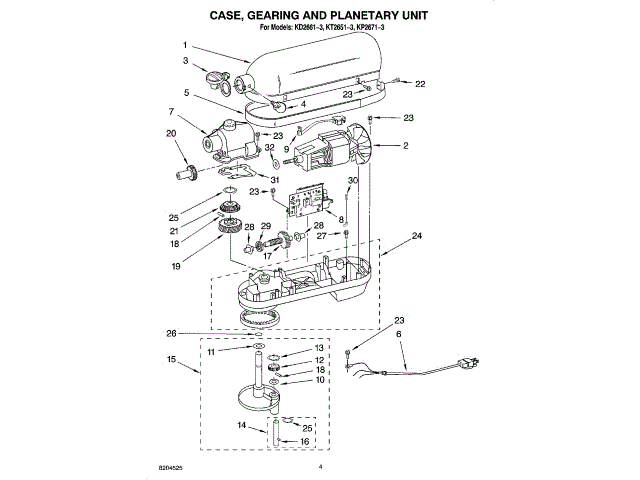
For tilt-head models, removing the rear band cover provides the most direct path to the motor assembly and electrical components. After removing all visible screws, gently work a plastic pry tool or wrapped flathead screwdriver along the seam to release plastic clips. Some models require first removing the speed control knob by pulling straight off (others have a setscrew underneath the knob cap). As the cover separates, watch for wiring harnesses that may still connect internal components—never pull hard on these delicate connections.
Base Plate Removal for Bowl-Lift Models
Accessing the motor in bowl-lift models requires removing the entire base plate, which means flipping the mixer upside down on a padded surface. Start by prying out the rubber feet to reveal hidden screws beneath—some models have decorative caps over these fasteners. After removing all base screws, carefully lift the plate while watching for wiring that may tether it to the main housing. Bowl-lift mixers often have additional brackets securing the motor assembly that require removal before accessing internal components.
Inside Your KitchenAid Mixer: What to Expect
Motor Brush Access for Routine Maintenance
One of the most common reasons for opening a KitchenAid mixer is replacing worn motor brushes, which typically need attention after 10-15 years of regular use. These small carbon blocks conduct electricity to the motor armature and show visible wear when depleted. On most models, brush access requires removing only the rear cover, though some designs incorporate the brushes into the motor assembly itself. Worn brushes often cause symptoms like intermittent operation, reduced power at certain speeds, or unusual sparking sounds during use.
Speed Control Board Location and Identification
Modern KitchenAid mixers (manufactured after approximately 2009) incorporate an electronic speed control board that manages motor performance across all speed settings. This circuit board typically mounts to the underside of the head assembly and connects via multiple wiring harnesses. When troubleshooting electrical issues, examine this board for visible signs of failure like burnt components, bulging capacitors, or corrosion around connection points. Before touching any electronic components, discharge static electricity by touching a grounded metal object to prevent damaging sensitive circuitry.
Critical Reassembly Tips to Avoid Costly Mistakes
Wire Management and Component Alignment
During reassembly, pay special attention to wire routing—many post-repair issues stem from pinched or misrouted wiring that creates shorts or connection problems. Ensure all connectors click fully into place with a distinct tactile feedback; partial connections often work initially but fail under vibration during operation. Before tightening any screws completely, verify that all components sit flush and properly aligned—forcing misaligned parts can crack plastic housings or damage internal mechanisms.
Functional Testing Before Final Closing
After reassembling about 80% of your mixer, perform a critical test before replacing all covers. Plug in the mixer and run it through all speed settings while listening for unusual noises and checking for proper operation. Verify that the attachment hub turns smoothly and that the mixer doesn’t vibrate excessively. If problems appear, the partially assembled state makes troubleshooting significantly easier than if you’d fully reassembled the unit first. Address any issues immediately before proceeding with final assembly.
When Professional Repair Makes More Sense
Complex Electrical Component Replacement
While replacing motor brushes or cleaning internal components falls within many DIYers’ capabilities, certain repairs demand professional expertise. Replacing a speed control board often requires soldering skills and electronic component knowledge that most home users lack. Similarly, transmission repairs involving gear replacement or lubrication require specialized tools and precise torque specifications that generic instructions can’t safely provide. If your disassembly reveals extensive damage, burnt components, or complex mechanical issues, professional service may prove more economical than risking further damage.
Warranty and Long-Term Value Considerations
If your KitchenAid mixer is relatively new or high-end, professional repair might better preserve its long-term value. Attempting disassembly on a newer model voids warranty coverage and could decrease resale value if components show signs of amateur repair. For mixers less than five years old or premium models like the Professional HD series, contacting KitchenAid’s service department often provides better outcomes than DIY approaches, especially when diagnostic expertise is needed to determine the root cause of problems.
Knowing how to open a KitchenAid mixer properly gives you the confidence to perform routine maintenance and diagnose common issues without immediately resorting to expensive professional service. By approaching disassembly methodically, documenting each step, and respecting the mechanical complexity of these appliances, many users successfully extend their mixer’s lifespan by years. Remember that patience pays off—rushing the process creates more problems than it solves, while careful attention to detail ensures your KitchenAid continues delivering reliable performance for all your baking adventures. If at any point during the process you feel uncertain, stop and consult model-specific repair resources before proceeding further.