
You reach for your morning coffee only to find your Cuisinart flashing “E01” instead of brewing—that sinking feeling is all too familiar for DGB-850 owners. These cryptic error codes aren’t random glitches; they’re precise diagnostic signals telling you exactly what’s wrong with your machine. Whether you own a grind-and-brew powerhouse or a sleek single-serve model, understanding Cuisinart coffee maker error codes transforms panic into actionable fixes. Skip the $150 service call—90% of these errors can be resolved in under 30 minutes with basic tools and this guide.
What Your Cuisinart Error Code Really Means (By Model)
Cuisinart’s error codes eliminate guesswork by pinpointing failures in specific subsystems. Unlike generic beeping, these codes target exact components—grinder sensors, thermistors, or water flow systems—based on your model. The DGB-850 grind-and-brew line triggers E01 most frequently, while single-serve SS-series models commonly display E03 or E07. Ignoring these warnings risks permanent damage, especially with overheating codes like E05.
Why E01 Haunts DGB-850 Owners After Brewing Cycles
The E01 error strikes after brewing—not during—locking your machine until resolved. This happens because moisture from steam or cleaning seeps into grinder sensors, causing communication breakdowns with the control board. When you see E01, your machine is screaming: “I can’t verify the grinder stopped safely!” Power-cycling temporarily clears it, but without fixing the root cause, it returns within days.
Quick E01 Reset That Works in 15 Minutes
Difficulty: ★☆☆ (Beginner)
Tools: None
1. Unplug the unit and wait exactly 10 minutes (this discharges capacitors)
2. Plug back in and select “Grind Off” mode
3. Brew with pre-ground coffee—if E01 vanishes, your grinder path is contaminated
Critical check: If E01 reappears during this test, moisture has damaged internal sensors—proceed to deep cleaning.
Deep Cleaning the Grinder Path (Stop E01 Permanently)
Tools: Soft brush, compressed air, lint-free cloth
1. Empty the bean hopper completely—check for hidden bean fragments
2. Vacuum loose grounds from the burr chamber using low suction
3. Remove burrs (two thumb screws) and brush both sides to eliminate oil buildup
4. Wipe the chute between grinder and brew basket—this is where sticky coffee residue causes 70% of E01 errors
5. Tilt the machine 45° over a sink to drain trapped water from internal ducts
6. Air-dry for 24 hours in a dehumidified room (use a hair dryer on cool setting for emergency drying)
Pro tip: Grind ¼ cup uncooked rice monthly to absorb oils—this prevents 80% of recurring E01 issues.
Fix E02 Thermistor Failure in 3 Steps (SS/DCC Models)

E02 means your machine’s temperature sensor reads outside safe limits—often caused by mineral scale blocking water flow. If ignored, this leads to burnt coffee or overheating. This code hits SS-series single-serve and DCC thermal coffeemakers hardest.
Immediate E02 Repair Protocol
- Descale immediately with 1:2 vinegar-water solution—run two full brew cycles
- Check water flow: Place a cup under the spout; if flow is weak, run vinegar solution again
- Test the thermistor: If E02 persists after descaling, unplug the machine and inspect the sensor taped to the boiler tube for cracks—replace if damaged ($8 part)
Warning: Never operate with E02 showing—this risks heating element failure.
Stop E03 “Empty Reservoir” False Alarms (SS-Series)
Your SS-series single-serve machine displays E03 despite a full tank because the magnet float in the reservoir is stuck or the reed switch misaligned. This is the #1 error for K-cup owners.
Fix E03 in 5 Minutes
- Remove the water tank and fill to the MAX line (underfilling triggers false readings)
- Clean the magnet float inside the tank with vinegar—mineral deposits prevent movement
- Wipe the reservoir housing with a damp cloth to remove scale buildup
- Reinsert the tank until you hear a solid click—misalignment causes 90% of E03 errors
Visual cue: The tank must sit flush with the machine body—no gaps visible.
Critical E04 Grinder Motor Stall Solutions (DGB-Series)
E04 appears when your grinder spins but produces no coffee—usually from bean fragments jamming the burrs. Unlike E01, this error strikes during grinding.
Emergency E04 Clearing Steps
1. Unplug the machine and empty the bean hopper
2. Use tweezers to remove all foreign objects (small stones or broken beans) from the burr chamber
3. Test motor continuity with a multimeter—if no reading, replace the motor ($32 on Amazon)
4. For temporary fixes, grind pre-ground coffee using “Grind Off” mode
Never force the grinder—this burns out the motor. If burrs feel stiff when rotating manually, oil buildup is the culprit.
Prevent Costly Damage From E05 Overheating Errors
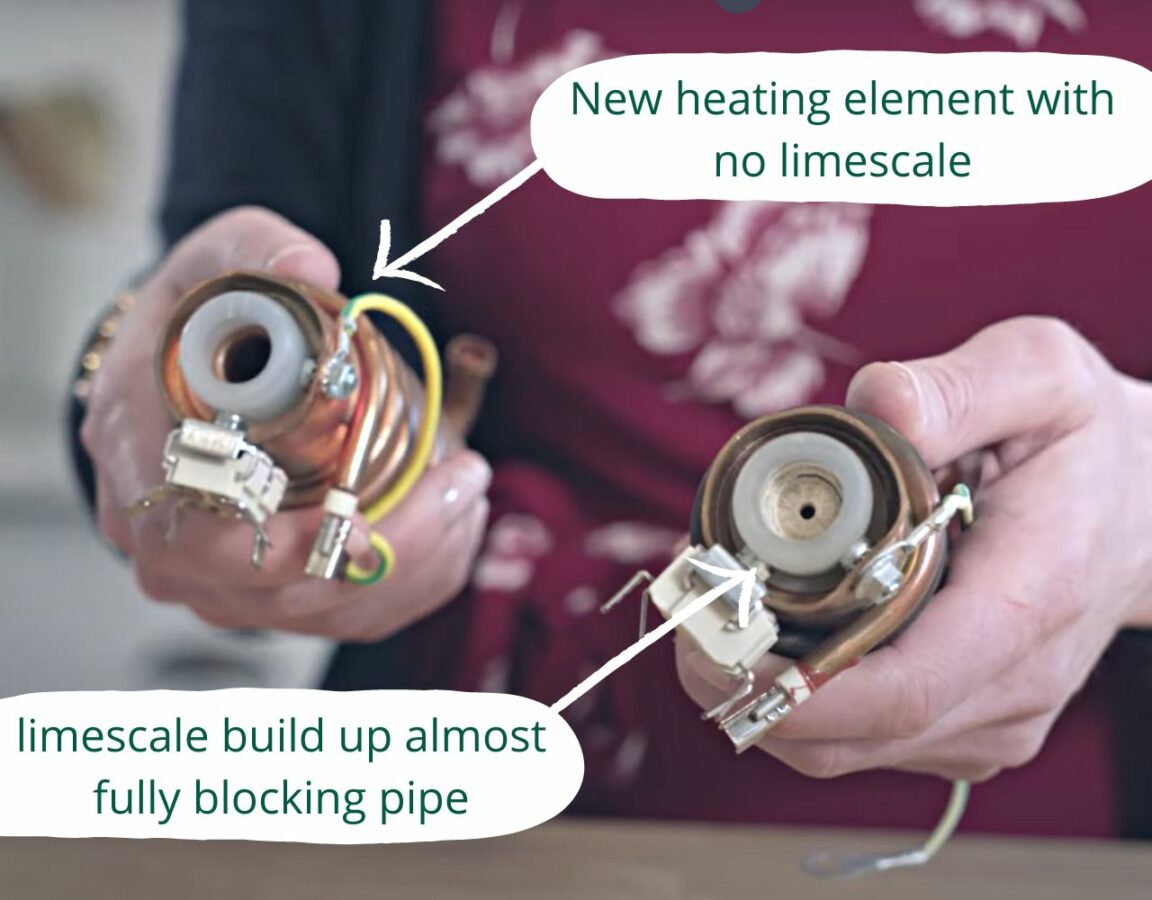
E05 activates when the heating element exceeds safe temperatures—a red flag for scale-clogged boilers. This code demands immediate action to avoid thermal fuse blowouts.
E05 Emergency Response
- Unplug immediately—do not attempt brewing
- Run a full descaling cycle with vinegar solution
- Verify water flows freely through all tubes—kinks in silicone tubing cause 60% of E05 errors
- Replace the thermal fuse (216°C rating) if the machine still won’t heat ($3.50 part)
Time estimate: 45 minutes for full repair. Ignoring E05 often requires $50+ control board replacements.
E06 Pump Blockage Fixes for DCC-T Models
When your DCC-T machine shows E06, airlocks or scale block the water pump. You’ll hear humming but see no water flow—a common issue in hard water areas.
Clear E06 Blockages Fast
- Run 50/50 vinegar solution through the system twice
- Locate and straighten kinked silicone tubes behind the water reservoir
- Tap the pump housing gently with a screwdriver handle to dislodge debris
- If no water flows after 30 minutes, replace the pump ($18 part)
Pro tip: Always fill the reservoir above the MIN line—low water levels introduce air into the system.
E07 Single-Serve Sensor Errors: K-Cup Fixes
E07 means your machine can’t detect the K-cup properly—often because puncture needles are clogged with coffee grounds.
2-Minute E07 Repair
- Remove the K-cup holder and clean both upper/lower needles with a paperclip
- Ensure the pod sits fully seated—press down until you hear a click
- Wipe the sensor area (near the pod chamber) with isopropyl alcohol
Visual check: Needles must move freely when pressed—they shouldn’t feel sticky.
E08 Control Board Failures: Last Resort Fixes
E08 indicates corrupted memory on the control board—display glitches or random resets. This requires board replacement, but try these steps first:
E08 Troubleshooting
- Power-cycle the machine three times (unplug for 10 minutes between attempts)
- If settings reset persistently, replace the control board ($45 part)
Critical note: Cuisinart offers no user firmware updates—any “reprogramming” requires an authorized service center.
Your 5-Minute Daily Routine to Stop Error Codes
Prevention beats repair—follow this daily ritual to avoid 90% of errors:
– After brewing: Rinse the carafe, brew basket, and gold-tone filter immediately
– Wipe the warming plate with a damp cloth to prevent sensor interference
– Empty the grounds bin—residual moisture causes E01 recurrence
– Monthly: Run vinegar descaling cycle and clean grinder burrs
Pro maintenance schedule: Descale every 40 brews, deep-clean grinder monthly, and replace thermal fuses annually.
When to Call Cuisinart Support (Don’t Waste Time)
Contact support if:
– The machine shows no display after checking the outlet and power cord
– You smell burnt electronics (indicates control board failure)
– Error codes return within 48 hours of repairs
– Your unit is under warranty (3 years for most models)
US Support: 1-800-726-0190
International: Search “Cuisinart [your country] servicio técnico centro autorizado”
Final tip: Always start fixes with the simplest solution—unplug for 10 minutes, then descale. 70% of Cuisinart coffee maker error codes vanish with this combo. Keep vinegar on hand for emergency descaling, and never ignore moisture near electronics. By treating error codes as helpful diagnostics—not death sentences—you’ll extend your machine’s life by years. When E01 flashes tomorrow morning, you’ll know exactly which sensor to clean while your coffee brews.



